Private tasks keep internal project work hidden from customers. When a project contains several internal tasks, changing each task’s visibility manually can be time-consuming and easy to miss.
You can standardize task privacy through a project template, or set it programmatically through the Rocketlane REST API.
In this article
Private tasks in a project template
Create a private task using the REST API
Choose a method
| Method | When to use it |
|---|---|
| Project template | Projects follow a repeatable structure, and the same tasks or phases should always stay private. |
| REST API | Tasks are created or updated through an integration or another automated workflow. |
Private tasks in a project template
Use a project template when projects should start with predefined private work. You can set privacy at two levels:
- Individual tasks: mark only the tasks that should be hidden.
- An entire phase: mark the phase, and every task in it is private.
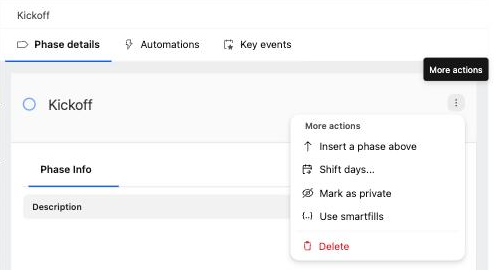
Mark a phase as private
- Open the project template from Templates > Project templates.
- In the plan, click the phase name to open its details.
- Click the More actions menu (three dots) in the phase details and select Mark as private.
Mark a task as private
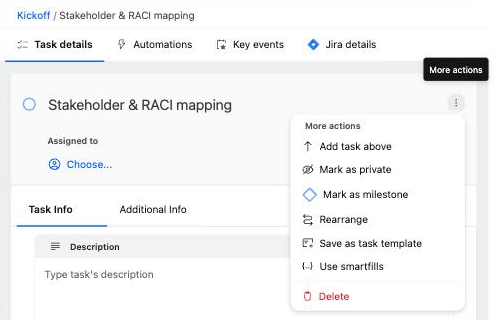
- Open the project template.
- Click the task to open its details.
- Click the More actions menu (three dots) in the task details and select Mark as private.
Template changes are saved automatically. When a project is created from the template, the privacy settings carry into the project.
Create a private task using the REST API
For tasks created through an integration, include "private": true in the task creation request.
Endpoint
POST https://api.rocketlane.com/api/1.0/tasks
Example request
{
  "taskName": "My task",
  "project": {
    "projectId": 12345
  },
  "private": true
}
The task is created as private and is not shared with customers.
Make an existing task private using the REST API
To change an existing task, send "private": true in an update request.
Endpoint
PUT https://api.rocketlane.com/api/1.0/tasks/{taskId}Replace {taskId} with the ID of the task you want to update.
Example request
{
  "private": true
}
Permissions
Who can change visibility depends on the permission set. Each permission can be scoped to private, shared, or both.
| Permission | What it controls |
|---|---|
| Visibility (tasks) | Whether a user can set a task to private, shared, or both. |
| Can manage phase visibility | Whether a user can set a phase to private, shared, or both. |
Things to know
- Template privacy standardizes visibility across repeatable project structures.
- Tasks created in a private phase are private automatically.
- A task inside a private phase, or under a private parent task, cannot be changed to shared. The REST API rejects the request.
- The API method suits tasks that are created or updated outside the Rocketlane interface.
- Use the Boolean value
true, without quotation marks, when setting theprivateproperty in a JSON request.
FAQ
Can I make every task in a phase private?
Yes. Mark the phase as private in the project template. Every task in that phase, including tasks added later, is private.
Can I make only selected template tasks private?
Yes. Mark the required tasks as private without changing the visibility of the phase.
Can an integration create a task as private?
Yes. Include "private": true when creating the task through the REST API.
Can I change an existing task from shared to private through the API?
Yes. Send a PUT request for the task with "private": true in the request body.
Why can't I make a task in a private phase shared?
Tasks follow the privacy of their phase or parent task. To share the task, move it to a shared phase, or make the phase shared first.
Which method should I use?
Use a project template when the same privacy structure should apply to repeatable projects. Use the REST API when task creation or visibility is controlled by an integration.
Summary
- Private tasks are hidden from customers.
- In a project template, use More actions > Mark as private on a task or on a whole phase.
- Projects created from the template keep those privacy settings.
- Tasks in a private phase are always private and cannot be made shared.
- Integrations can create or update private tasks with "private": true through the REST API.