In this article
Rocketlane AI is designed to help teams manage project data more efficiently by pulling insights directly from their daily interactions. Instead of manually digging through threads, the AI uses Enterprise Listening to track sentiment and feedback across emails and meetings.
Rocketlane AI can read interaction data, such as emails and meeting transcripts, and turn it into structured insights. This article explains how that works, which objects are involved, and what enablement or implementation teams should understand before configuring or troubleshooting anything.
AI data sources in Rocketlane
Rocketlane AI can be powered by two broad categories of data sources.
Rocketlane data
This is the structured data that lives inside your Rocketlane workspace across accounts, projects, resources, and financials. It tells the AI what the project is and where it stands in your business ecosystem.
Examples include:
Interaction data
This is the external context - interaction data harvested from the actual conversations happening between your team and your customers. It helps the AI understand the sentiment and nuance of the relationship.
Examples include:
- Emails
- Meeting transcripts
What is a transcript
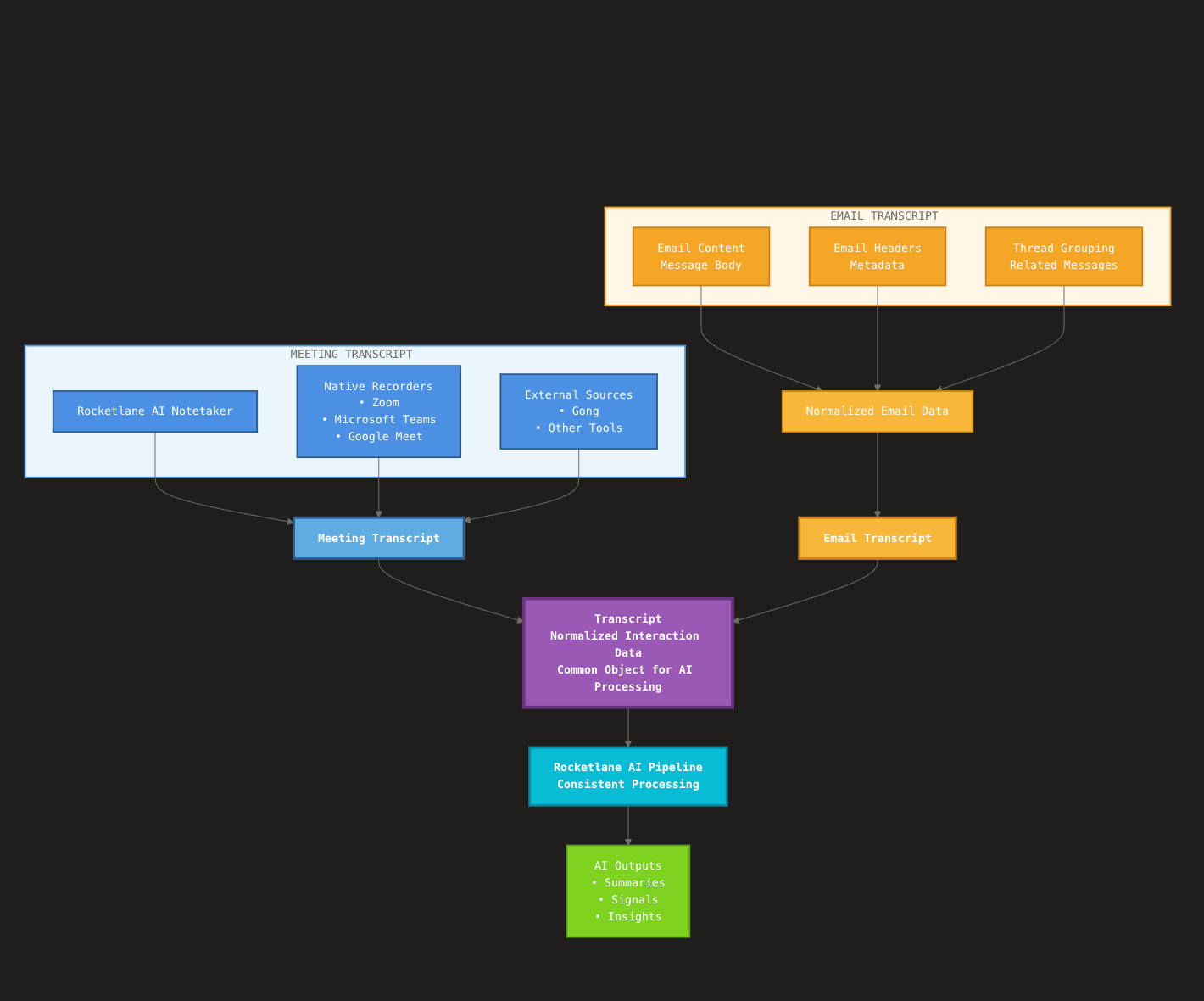
A transcript is the normalized interaction data Rocketlane uses as the input for AI processing. Rocketlane AI treats different interaction sources (meetings and emails) as a common transcript object that the pipeline can process consistently.
Meeting transcripts
A meeting transcript may come from:
- A notetaker (for example, Rocketlane AI Notetaker)
- A native recorder (via Zoom, Teams, or Google Meet)
- An external source (for example, Gong)
Email transcripts
An email transcript is the email content plus headers, normalized and grouped into threads. It is a normalized representation of an email thread that combines message content and key headers into a single structured payload.
What Rocketlane generates from transcripts
From transcripts, Rocketlane generates two broad outputs, both classified as AI pages.
AI pages
AI pages is the umbrella term for structured AI-extracted content. In the product, this refers to:
These pages surface structured AI-extracted information, including:
- Summaries
- Action items
- Key decisions
- Risks or opportunities mentioned in the interaction
Signals
Signals are insights generated through AI, based on transcripts. They come from meeting and email transcripts linked to an Account, and are designed to:
- Summarize important patterns or events in customer interactions.
- Classify those patterns as Risk, Opportunity, or Operational.
- Link back to the underlying transcripts through citations - excerpts or references that trace the insight to its source.
Object model
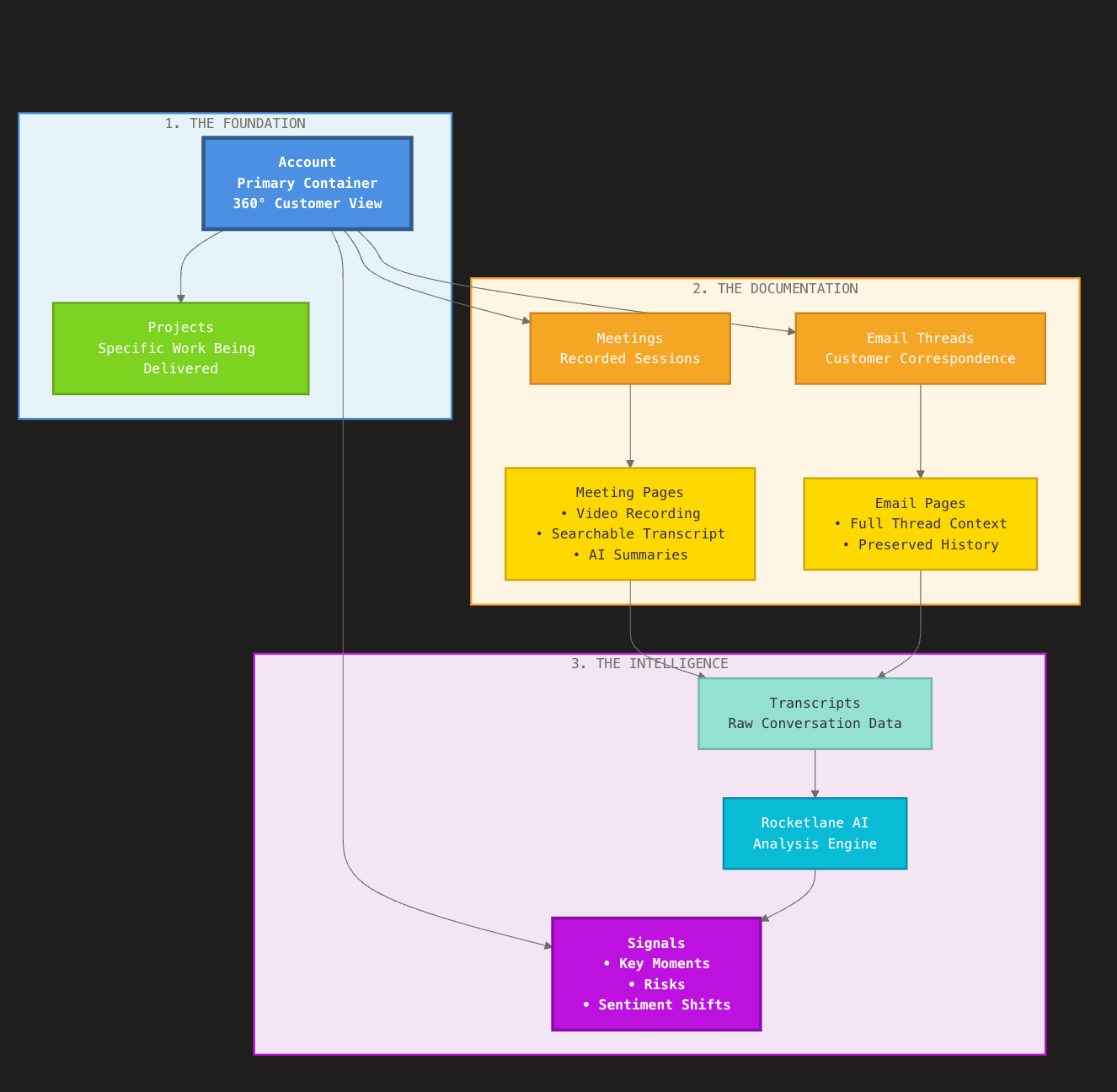
At its core, Rocketlane organizes your work around the Account. This serves as the central hub where projects, interaction data, and intelligence converge to give you a 360-degree view of the customer relationship.
The relationship between your data follows a logical flow from raw conversation to high-level business intelligence.
1. The foundation: Accounts and projects
An Account acts as the primary container. It houses one or more Projects, representing the specific work being delivered, alongside all associated customer interactions.
2. The documentation: Meeting and email pages
Rocketlane automatically transforms every raw interaction into a structured record:
- Meeting pages: Every recorded session is processed into a dedicated page featuring the video recording, a searchable transcript, and AI-generated summaries.
- Email pages: Ongoing email threads between the customer and your team are captured as email pages, ensuring the full context of the correspondence is preserved and accessible.
3. The intelligence: Signals
The output of this ecosystem is the Signal.
- Extraction: Rocketlane AI analyzes transcripts from your meeting and email pages to identify key moments, risks, or sentiment shifts.
- Account correlation: Once detected, signals are attached directly to the Account. This allows leadership to monitor the health of a customer relationship without needing to read every individual email or watch every meeting.