Snowflake Secure Data Sharing provides a direct and maintenance-free way to access your Rocketlane data inside your Snowflake data lake. This article explains the problem this solves, the integration methods supported by Rocketlane, and the detailed steps to enable Snowflake Secure Data Sharing.
Overview
Organizations often store project, billing, HR, and CRM data across multiple systems. This makes unified reporting difficult and slows down decision making. Rocketlane supports several integration approaches so you can bring your operational data into your analytics environment with accuracy and consistency.
Snowflake Secure Data Sharing is the simplest method if you already use Snowflake. It gives you direct, up-to-date access to Rocketlane tables without manual extraction or ETL.
When to Use Snowflake Secure Data Sharing
Use this option if:
Your organization already uses Snowflake
You want instant access to Rocketlane data with no data copying
You want a fully governed, secure, and low-maintenance integration
You want to join Rocketlane data with finance, HR, or CRM systems inside Snowflake
Example Use Cases
Integrating Rocketlane data with your Snowflake lake helps you solve several business analytics problems.
Project Profitability
Combine time tracking and project allocation data with billing or payroll to calculate margins.
Team Utilization
Analyze workload distribution, predict bottlenecks, and plan staffing.
Time to Value (TTV)
Measure how quickly customers complete onboarding milestones.
Integration Approaches Supported by Rocketlane
Rocketlane provides three supported methods for bringing data into your data lake.
API-Based Integration
Rocketlane offers a full set of public APIs that let you extract and load data into your data lake or internal applications.
How it Works
Use the APIs to fetch entities such as projects, tasks, accounts, and time entries.
Use tools like Workato to cleanse or transform the data before storage.
Pros
Full control over extraction and transformation
Flexible scheduling and data selection
Cons
Requires development time and ongoing maintenance
Less scalable for large datasets or frequent updates
Recommended For
Teams that prefer to manage integrations internally and have engineering capacity.
ETL-Based Integration (Preferred: Fivetran)
Rocketlane provides a native connector through Fivetran.
How it Works
Fivetran automatically extracts, transforms, and loads Rocketlane data into Snowflake, BigQuery, Redshift, or your preferred warehouse.
Fivetran keeps your analytics environment up to date using continuous syncs.
Pros
Minimal configuration
Automatic schema handling
Reliable incremental updates
Cons
Requires a Fivetran subscription
Less flexibility compared to direct API control
Recommended For
Teams looking for a no-code, low-maintenance data integration solution.
Snowflake Data Sharing (Secure Data Share)
Snowflake Secure Data Sharing is the most seamless option for organizations that use Snowflake and are on the Rocketlane Enterprise plan.
How it Works
Rocketlane creates views on top of your Rocketlane data and shares those views securely with your Snowflake account using Snowflake account sharing
You access Rocketlane data in Snowflake as a read-only set of views, as if they were part of your own environment
You can add your own additional permissions on top of the shared views if needed
Pros
No data copying or ETL jobs
Data refreshed every hour, so analytics are near real time
High performance and security, governed by Snowflake’s sharing model
Minimal setup and ongoing maintenance on your side
Cons
Available only to customers on the Rocketlane Enterprise plan
Requires that you have a Snowflake account
New tables are added based on use-case review and may require a request to Rocketlane
Recommended For
Enterprises that already rely on Snowflake and want a maintenance-free, read-only integration with Rocketlane
Prerequisites
Before you start, ensure the following:
You are on the Rocketlane Enterprise plan
You have an active Snowflake account in any region that Snowflake supports
You have a Snowflake admin user who can access account-level sharing settings
You have a Rocketlane workspace admin or technical contact who can send details to Rocketlane
Setting Up Snowflake Secure Data Sharing
This setup follows a simple two-step process designed for security and ease of use.
How Snowflake Secure Data Sharing Works with Rocketlane
At a high level:
You share your Rocketlane workspace domain and Snowflake account identifier with Rocketlane.
Rocketlane configures a secure account share in Snowflake and creates views on top of your Rocketlane data.
Your Snowflake admin accepts the share, after which the Rocketlane views appear in your Snowflake account.
Your internal teams query those views and, if needed, apply additional permissions using your usual Snowflake practices.
All access is read only. You cannot modify underlying Rocketlane data from Snowflake, which keeps your application data safe and consistent.
Step 1: Provide Required Details
Send the following information to care@rocketlane.com:
Rocketlane company domain
Format: yourcompanyname.rocketlane.comSnowflake Instance ID
Example: xy12345.ap-southeast-1
You can use the above screenshot of the account identifier from Snowflake for reference.
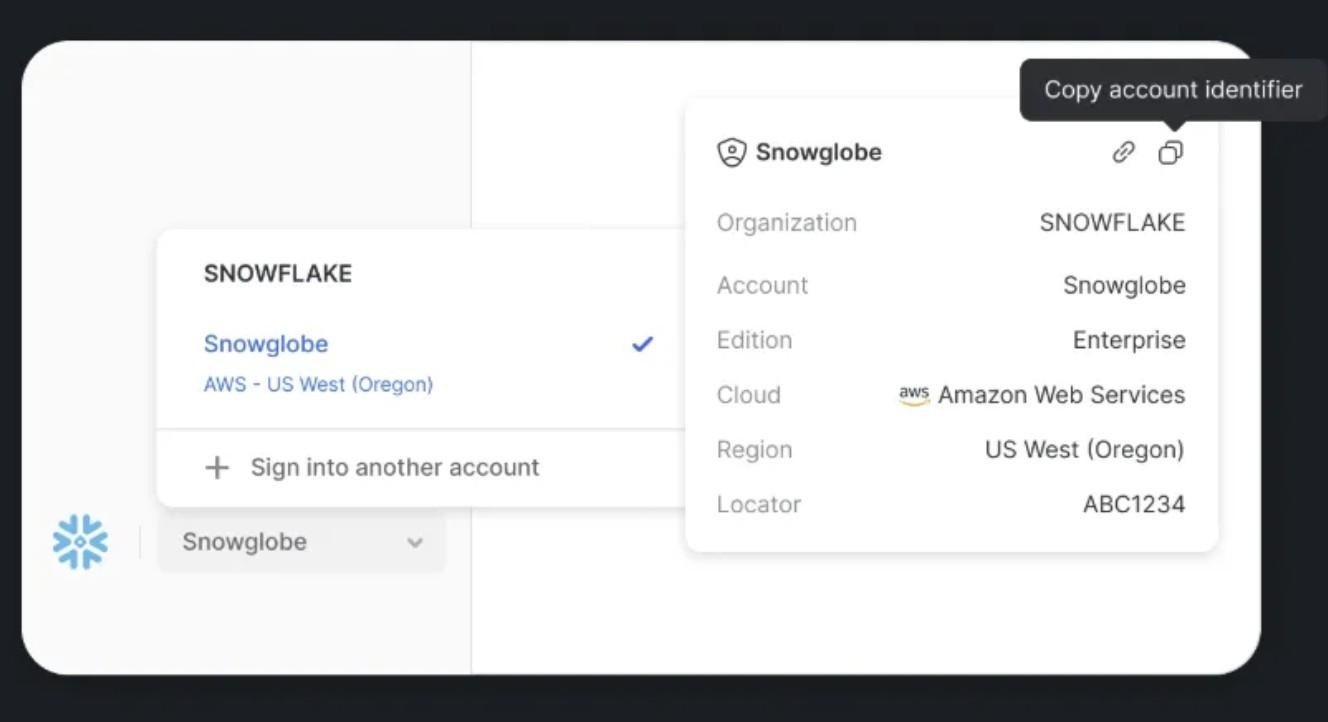
Once you submit the request, the setup typically takes two to three business days.
Step 2: Enable and Use the Shared Data
After enabling data sharing, Rocketlane will make the datasets available in your Snowflake instance.
What Your Snowflake Admin Needs to Do
Your Snowflake admin must accept the shared data and reference it in the appropriate database. Your Customer Success Manager or Onboarding Specialist will guide you through this step.
What Rocketlane Shares with You
Your assigned CSM will provide:
A schema overview describing the main entities and their views, such as
projects
tasks
accounts
users
time_entries
An entity relationship diagram (ERD) showing how these entities relate to each other
Sample queries for exploring Rocketlane data in Snowflake
These materials help your data and analytics teams quickly understand how to join Rocketlane views with each other and with your internal datasets.
Behavior and Data Refresh
Key behavior details for Snowflake Secure Data Sharing:
Access type:
All objects you receive from Rocketlane are read only.
This is by design for safety and consistency, and is not a limitation of the integration.
Data freshness:
Rocketlane updates the shared data every hour.
In most cases, data visible in Snowflake is no more than 1 hour behind what you see in the Rocketlane application.
Regions and clouds:
Rocketlane supports any region that Snowflake itself supports for secure sharing.
Schema changes and new tables:
Rocketlane manages the core schema that is shared with you.
If you need additional tables or entities, you can request them through your CSM or care@rocketlane.com.
New tables are added after Rocketlane reviews your use cases to keep the shared schema consistent and maintainable.
What You Can Do Once Enabled
You can:
Query Rocketlane tables directly inside Snowflake
Join Rocketlane data with finance, HR, CRM, or other systems
Feed the combined dataset into Power BI, Tableau, Looker, or other BI tools