Professional Services teams need a reliable way to turn sales pipeline into delivery plans. Rocketlane’s recommended approach is to map each Salesforce project record to one Rocketlane project.
This article explains how to structure Salesforce records, create Rocketlane projects from Salesforce opportunities, forecast delivery work before a deal is closed-won, and keep project data in sync between Salesforce and Rocketlane.
In this article
- The core idea: one project per deliverable
- Why we recommend a 1:1 Salesforce Project to Rocketlane Project model
- Where the projects come from
- Forecasting before Closed-Won
- How the integration behaves
- Naming, routing, and templates
- Supported variations
- Sample scenario
- Milestones and financial deliverables
- Field sync
- Error handling and governance
- Frequently asked questions
- Implementation checklist
The core idea: one project per deliverable
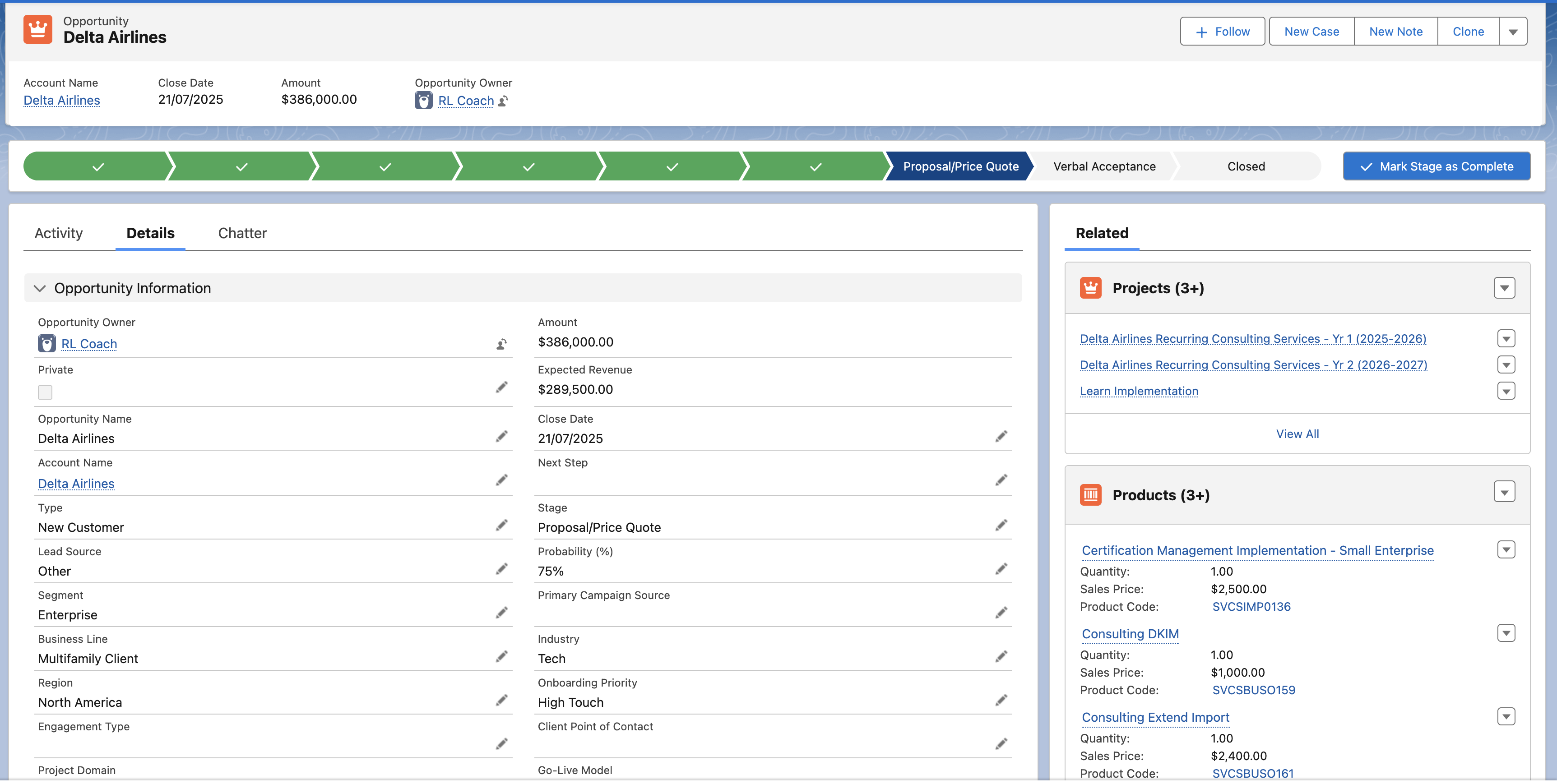
In Salesforce, the Opportunity remains the commercial parent. Under the Opportunity, you can create one Salesforce project record, such as Project__c, for each deliverable you want to manage separately in Rocketlane.
A deliverable can be:
- An implementation SKU or service line item.
- A bundled platform rollout.
- A retainer or bucket of hours.
- Any workstream with its own plan, dates, staffing, budget, health, and outcomes.
If a workstream needs to be planned, staffed, tracked, and reported separately, create its own Project__c record and map it to one Rocketlane project.
This model helps PS leaders forecast delivery work during the sales cycle, lets resource managers soft-book capacity early, and gives Finance clean project-level data once delivery starts.
One Opportunity to many projects
Why we recommend a 1:1 Salesforce Project to Rocketlane Project model
A one-to-one relationship between a Salesforce project record and a Rocketlane project is the most reliable way to run services from CRM through delivery.
Long-term scalability
- As your services catalog grows, each new deliverable becomes one more
Project__crecord and one more Rocketlane project. - Bundles stay flexible. You can keep a bundle together as one project when delivery moves as one plan, or split it into separate projects when timelines or teams differ.
Deterministic sync and governance
- Every update has exactly one target in Salesforce and one target in Rocketlane.
- Retries are safer because the integration updates the existing mapped project instead of creating duplicates.
Cleaner reporting and accountability
- Delivery data such as health, milestones, hours, burn, revenue, and margin can roll up from project to Opportunity, Order, and Account in Salesforce.
- Dashboards are easier to trust because scope, dates, staffing, and delivery results live at the same level of detail.
Why not 1:many or many:1?
One-to-many or many-to-one models make sync ambiguous. If multiple records point to the same project, it becomes harder to determine which record should control dates, ownership, milestones, revenue events, or acceptance status.
This can lead to field conflicts, duplicate projects, reconciliation work, and manual cleanup.
Where the projects come from
Most organizations create Project__c records from data that already exists in Salesforce.
- Opportunity Line Items: Use this when you sell implementation SKUs or services directly on the Opportunity.
- Quote Line Items: Use this when CPQ quotes are the source of truth.
- Order Items or Contracts: Use this when projects are created only after booking.
A record-triggered Salesforce Flow can evaluate these line items and decide which ones should create projects. Non-delivery items, such as licenses that do not require PS delivery, can be ignored. Delivery items, such as implementations, consulting packages, or hours buckets, can create Project__c records.
If multiple products are delivered together, the Flow can create one project for the bundle. If they will be delivered on different timelines or staffed by different teams, create separate projects.
Deal-to-project flow

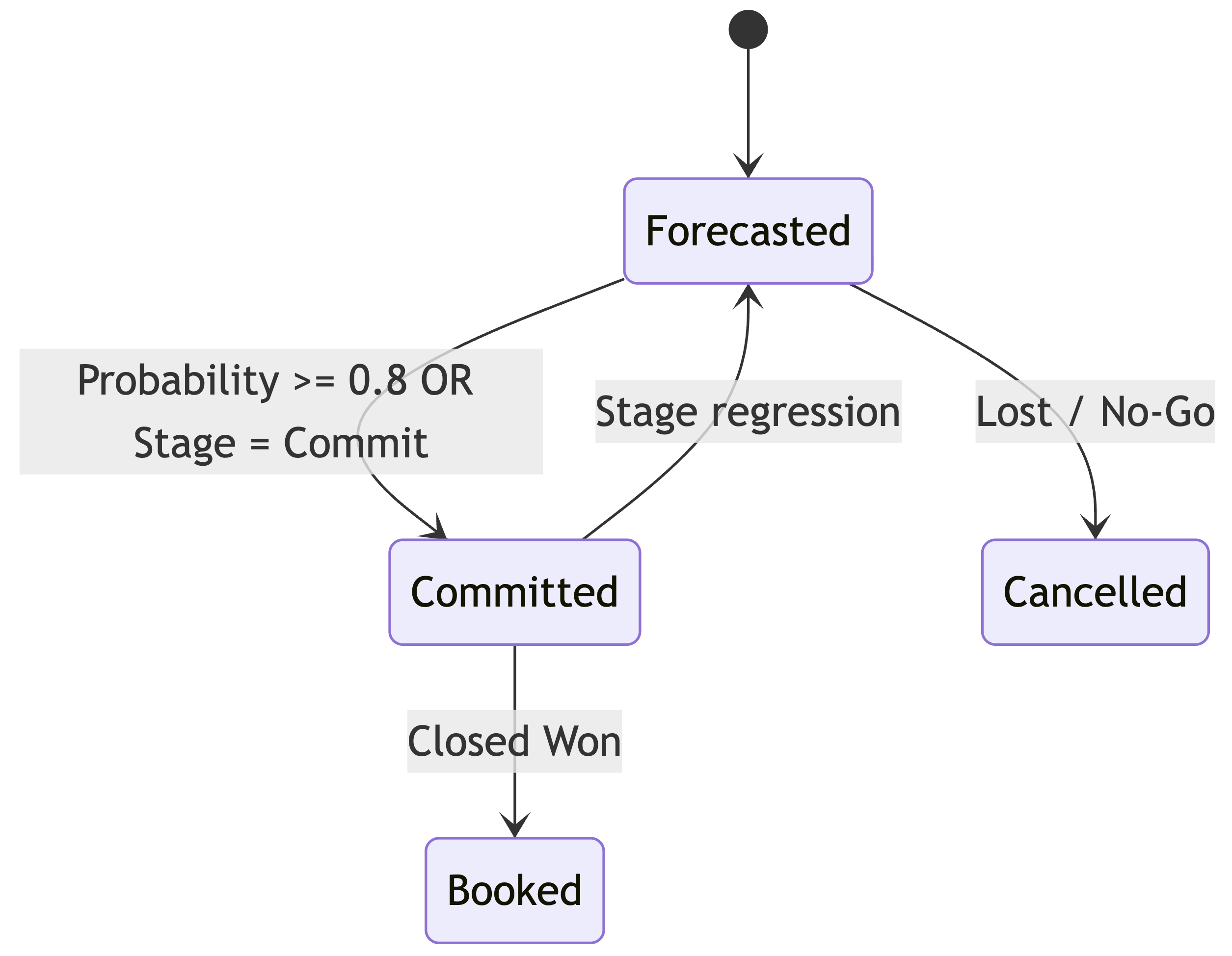
Forecast lifecycle
Forecasting before Closed-Won
PS teams often need to plan delivery work before revenue is booked. You can support this by creating forecasted Salesforce project records before the Opportunity reaches Closed-Won.
For example, when an Opportunity reaches a defined stage, such as Proposal or Negotiation, or crosses a probability threshold such as 50%, Salesforce can create forecasted Project__c records.
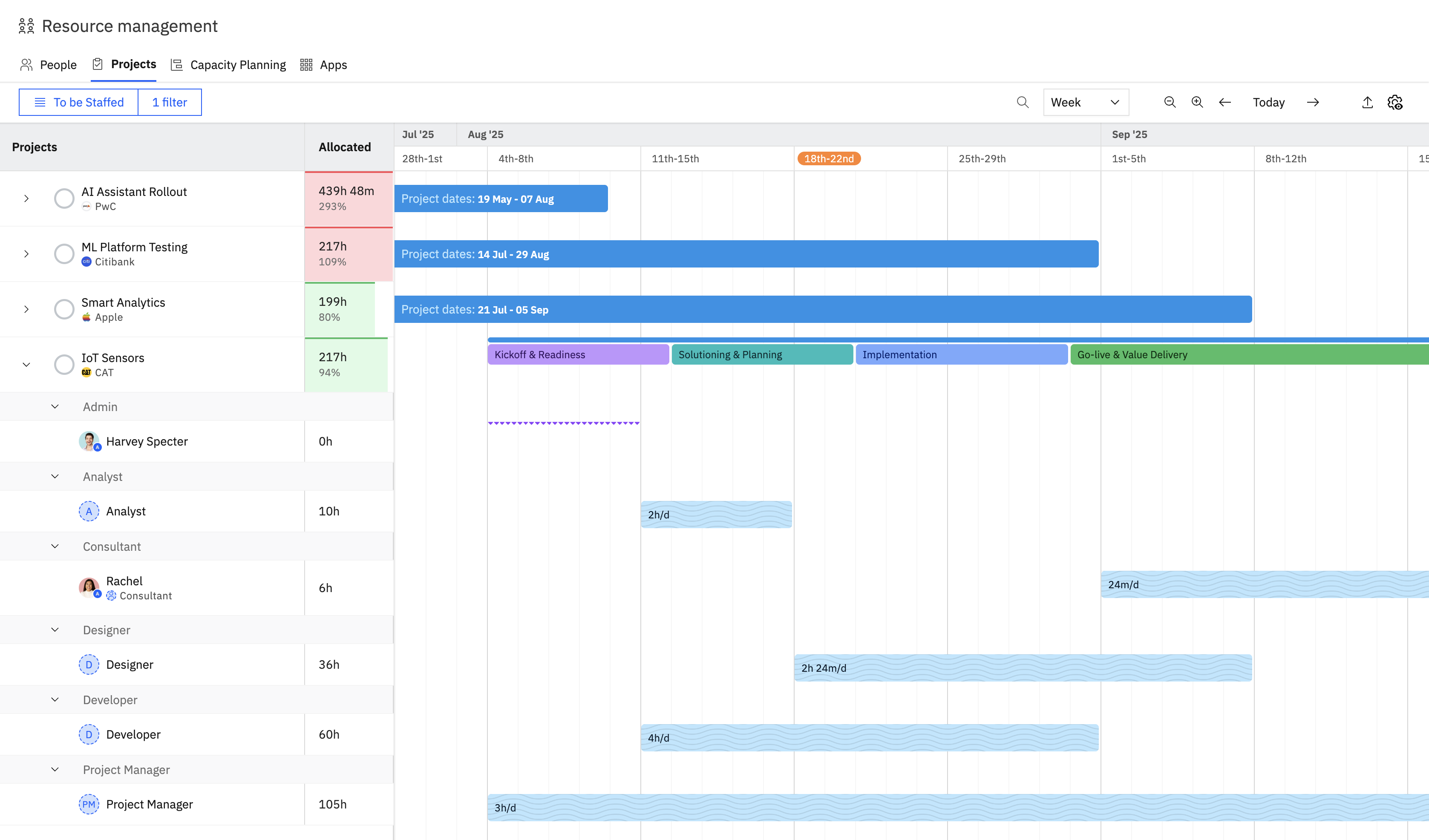
If required, these records can also provision tentative projects in Rocketlane. Tentative projects can appear in capacity and pipeline views while staying out of live delivery metrics.
Resource managers can use placeholders to soft-book roles or skills early, then convert them to hard allocations once the deal becomes more certain.
A typical forecast lifecycle can look like this:
- Forecasted: Created when the deal reaches an early planning threshold.
- Reserved: Used when confidence increases, such as at 80% probability.
- Booked: Used when the deal is Closed-Won and delivery is confirmed.
- Cancelled or updated: Used when the deal slips or is lost, so capacity can be released.
Capacity dashboard with soft and hard allocations
How the integration behaves
The integration has two main jobs:
- Create and update Rocketlane projects from Salesforce.
- Sync delivery signals from Rocketlane back to Salesforce.
Project creation is idempotent. Salesforce and Rocketlane use a unique mapping between the Salesforce project record and the Rocketlane project. This prevents duplicate projects and makes retries safe.
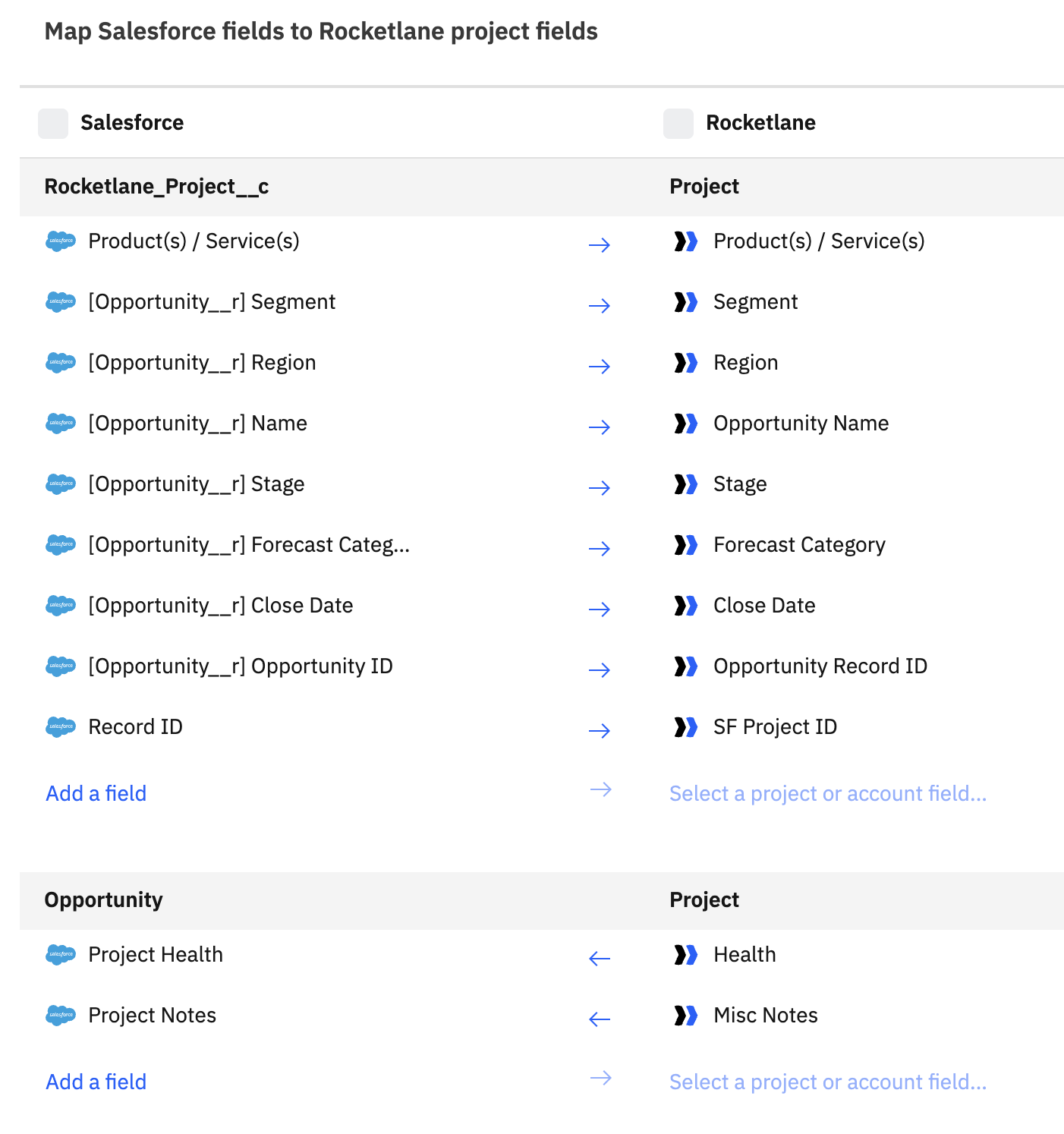
Updates can be bi-directional. When dates, owners, or project attributes change in Salesforce, the integration updates the mapped Rocketlane project. When delivery progresses in Rocketlane, signals such as milestone completion, phase progress, hours, budget burn, and project health can be written back to Project__c in Salesforce.
For complex enterprise setups, Rocketlane’s embedded iPaaS can sit between systems to handle routing, scripting, retries, dead-letter queues, and audit logs. For many customers, the native Salesforce integration is sufficient and simpler to operate.
Salesforce automation workflow
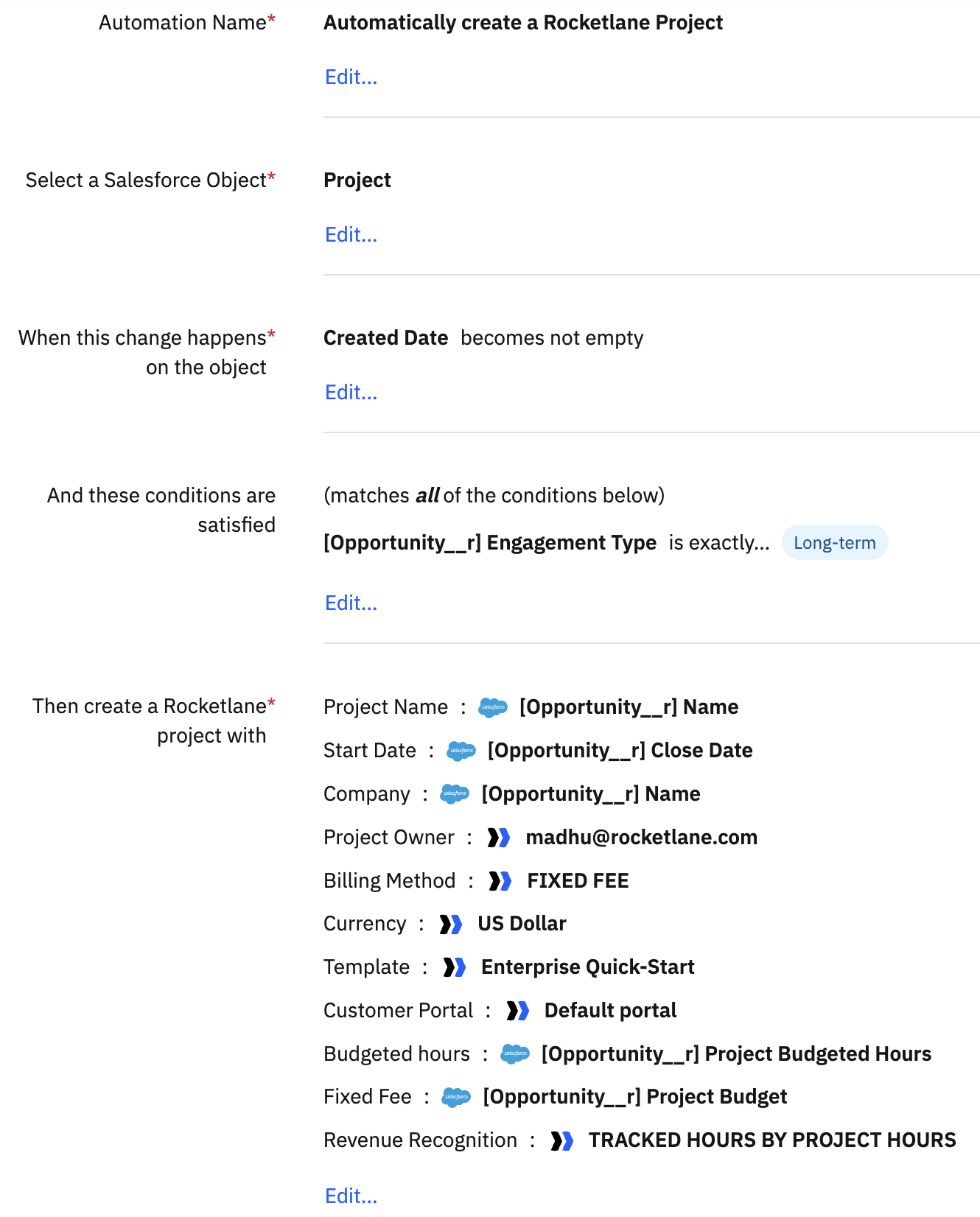
Rocketlane and Salesforce field mapping
Naming, routing, and templates
Use a predictable naming format for projects. For example:
{Account} - {SKU or Bundle} - {Region}Use routing conditions, such as SKU, Product Family, Region, and Segment, to select the right Rocketlane template. Maintain these routing values as Salesforce fields so admins can update the logic without code.
You can also use validation rules to block project creation until required fields are present, such as owner, key dates, region, and routing key.
Supported variations
One project for a bundle
Create one project for a bundle when delivery is integrated and the work moves as one plan. For example, a platform rollout that always ships as one coordinated project can be represented as one Project__c and one Rocketlane project.
Separate projects per product
Create separate projects when products have different timelines, staffing needs, owners, or delivery outcomes.
Hours buckets and retainers
For hours buckets or retainers, create a Project__c that represents the bucket, such as Advisory - 100h. Rocketlane can track time budgets and burn-down, and consumption can be synced back to Salesforce.
Amendments and upsells
For amendments and upsells, create a new Project__c and link it to the original project. Depending on your process, you can either extend the existing Rocketlane project with a new phase or scope, or create a new Rocketlane project.
Project__c should map to exactly one Rocketlane project.Orders and contracts
If your organization creates projects only after booking, Orders or Contracts can act as the commercial parent. The same pattern applies: each deliverable creates a Project__c, which then creates one Rocketlane project.
Sample scenario
Imagine an Opportunity at Proposal stage with three Quote Line Items:
- Core Platform
- Data Migration, Phase 2
- Advisory 100h
When the Opportunity reaches 60% probability, Salesforce creates three Project__c records, marks them as Forecasted, and provisions three tentative Rocketlane projects based on policy.
Resource managers assign soft placeholders for a Project Manager, migration specialist, and consultant pool. If Data Migration moves into an earlier phase, the date is updated on the specific Project__c, and Rocketlane receives only that update.
At Closed-Won, the projects move to Booked. The PM converts soft allocations into hard allocations and starts the delivery playbooks. As delivery progresses, Rocketlane sends milestone dates, health, hours, and other signals back to the mapped Salesforce project records.
If Sales later sells an additional 40 hours of advisory work, Salesforce creates a new Project__c linked to the original retainer. Rocketlane can then create a new scoped project, keeping forecasting and attribution clean.
Milestones and financial deliverables
Milestones connect delivery progress with commercial events. They can support project execution, acceptance tracking, billing, and revenue recognition.
What to model
In Salesforce, you can use a child object such as Project_Milestone__c under Project__c.
Common fields include:
- Name
- Type, such as Delivery or Financial
- Planned Date
- Target Date
- Acceptance Date
- Status
- Amount, if financial
- Recognized Amount, if required
- Rocketlane Milestone ID
In Rocketlane, use milestones, phases, and tasks to drive execution. You can sync status, due dates, actual dates, acceptance, and financial tags back to Salesforce for reporting.
How milestone sync flows
- Creation: Milestones can originate from the Rocketlane template or from Salesforce, such as from a quote, order, or SOW.
- Sync to Rocketlane: If milestones are defined in Salesforce, push them to Rocketlane when the project is created.
- Execution and acceptance: Rocketlane updates status and dates. When a milestone is accepted, the acceptance status can be pushed back to Salesforce.
- Financial linkage: Milestone amount can be tied to billing or revenue recognition events where needed.
- Roll-ups and dashboards: Milestone progress and financial signals can roll up to the project, Opportunity, and Account.
Field sync
Each Salesforce project record should carry a focused set of fields that make synchronization predictable.
Identity and linkage fields
These fields anchor the relationship between Salesforce and Rocketlane and support safe updates:
Project__c_IDRocketlane_Project_ID__c- Account lookup
- Opportunity lookup
Commercial context fields
Commercial fields help select the right template, entitlement window, and financial rollup:
- SKU or Product Code
- Quantity or Term
- Amount or ARR
Operational fields
Operational fields help route projects to the right Rocketlane template or playbook:
- Region
- Practice
- Project Owner
Forecasting fields
Forecasting fields help with pre-close capacity planning:
- Forecast Status, such as Forecasted, Reserved, or Booked
- Confidence
- Target Start and Target End
Rocketlane to Salesforce fields
Rocketlane can send delivery signals back to Salesforce, such as:
- Project health and notes
- Milestone statuses and dates
- Phase progress
- Task counts
- Hours burned and remaining hours
- Recognized revenue and margins, where modeled
Error handling and governance
Production integrations should fail gracefully. The unique 1:1 mapping between Salesforce and Rocketlane helps retries update the existing project instead of creating duplicates.
For complex deployments, embedded iPaaS can provide:
- Retries with exponential backoff
- Dead-letter queues for failed records
- Correlation IDs for tracing project activity across systems
- Audit logs and monitoring dashboards
Salesforce validation rules can also prevent incomplete records from creating incomplete projects in Rocketlane.
Frequently asked questions
What happens when Close Dates move?
Salesforce pushes the updated dates to the corresponding Project__c. The integration then updates the mapped Rocketlane project. Because the relationship is 1:1, there is no ambiguity about which project should be updated.
Can we keep one project for a multi-SKU bundle?
Yes. If the bundle will move as one delivery plan with one team, create one Project__c and represent the components inside Rocketlane using budgets, phases, milestones, and tasks. If the components have different schedules or staffing needs, split them into separate projects.
How do we avoid duplicate projects?
Use the unique 1:1 mapping between the Salesforce record and Rocketlane project. If a network issue occurs during provisioning, the retry updates or resumes the mapped project instead of creating another one.
Can we recognize revenue from Rocketlane?
Yes, if your financial policy is modeled. Rocketlane can provide recognized revenue and cost or margin telemetry back to Salesforce or your ERP, either on Project__c or a finance object.
We prefer Orders to Opportunities. Is the model different?
The commercial parent changes, but the pattern stays the same. Orders or Contracts remain the source of commercial truth, and each deliverable still creates a Project__c that maps 1:1 to a Rocketlane project.
Implementation checklist
- Create a clean
Project__cobject with identity, routing, commercial, operational, and forecasting fields. - Build a record-triggered Salesforce Flow that evaluates Opportunity, Quote, Order, or Contract line items and creates the right number of project records.
- Configure Rocketlane integration rules to create projects and map core fields in both directions.
- Use embedded iPaaS if your setup requires advanced routing, scripting, retries, dead-letter queues, or audit logs.
- Pilot the setup with a few real deal types, such as a single SKU, bundled rollout, and retainer, to validate forecasting, resource planning, and finance reporting.