Project plans rarely hold exactly as written. Tasks take longer than estimated, allocations shift, and expenses come in over time. Comparing tracked work against the original budget shows what has been spent, but not where the project is likely to finish.
Estimate at completion (EAC) and Estimate to complete (ETC) forecast where a project is heading, in hours and in cost. Project managers can use them to spot a likely overrun while there is still time to act, and finance teams can use the cost values to recognize revenue on fixed fee projects.
Take a course on Financial Management here.
In this article
Before You Start
- EAC and ETC are part of Financial Management, which is available on the Premium and Enterprise plans.
- EAC and ETC in hours need resource allocations on the project, either manual or auto-allocated.
- EAC Cost and ETC Cost also need cost rates for the team members on the project. For more information, refer to Setting up Cost Rates.
- To include planned expenses in ETC Cost, add them to the project as non-billable expense budgets.
How EAC and ETC Work
ETC is the work still left on the project. EAC is the work already done plus the work still left, which is the total the project is expected to reach when it finishes. Rocketlane calculates both in hours and in cost.
| Value | What it measures | Formula |
|---|---|---|
| Estimate to completion (ETC) | Hours still needed to finish the project | Depends on how resources are allocated (see below) |
| Estimate at completion (EAC) | Total hours the project is expected to take | ETC + tracked hours |
| ETC Cost | Cost still needed to finish the project | Cost of remaining time + unspent non-billable expense budgets |
| EAC Cost | Total cost the project is expected to reach | Tracked cost + ETC Cost |
For example, if EAC is higher than the budgeted hours, or EAC Cost is higher than the planned cost, the project is on track to go over budget. Seeing this early lets project managers adjust allocations, scope or the timeline before the budget is exceeded.
All four values update automatically as time is tracked, allocations change, tasks are completed and expenses are approved.
Calculating ETC and EAC in Hours
Resources can be allocated to a project manually or with auto-allocate. The ETC calculation depends on which one the project uses.
Projects With Manual Allocation
- ETC = The sum of all allocated hours from today onward.
- EAC = ETC + total tracked hours.
Example: The project "Modert" runs for 20 days. Its budgeted hours are 200h, and its resources are allocated 8h per day for 20 days, which is 160h.

Today is day 4 of the project. The team has tracked 24h in timesheets so far.

- ETC = 16 remaining days × 8h per day = 128h
- EAC = 128h (ETC) + 24h (tracked hours) = 152h

Projects With Auto-Allocation
- ETC = For every task that is not completed, the estimated effort minus the hours tracked on that task, added together. If a task's tracked hours are equal to or greater than its estimated effort, that task adds 0 to ETC.
- EAC = ETC + total tracked hours.
Example: The sample project "Acme" has the following tasks:

- Total budgeted hours = 60h
- Total allocated hours = 50h
- Hours tracked on completed and in-progress tasks = 7h + 8h + 6h = 21h
- ETC = 4h (10h estimated minus 6h tracked on the Requirement gathering task) + 10h + 10h = 24h
- EAC = 24h (ETC) + 21h (tracked hours) = 45h

Calculating ETC Cost and EAC Cost
Hours alone do not show the financial picture when team members have different cost rates, or when the project has expenses. ETC Cost and EAC Cost apply the same forecast to cost.
ETC Cost
ETC Cost is the cost of the remaining time plus the remaining non-billable expenses:
- Remaining time cost: The remaining hours, calculated the same way as ETC in hours, multiplied by the cost rate of each team member they are allocated to. On auto-allocated projects that plan effort at the phase level, the remaining effort is taken from the phases instead of the tasks.
- Remaining expense cost: For each non-billable expense budget, the budget amount minus the expenses approved against it. If approved expenses exceed the budget, that budget adds 0.
EAC Cost
EAC Cost = Tracked cost + ETC Cost
Tracked cost is the actual cost so far: tracked hours multiplied by each team member's cost rate, plus the cost of approved expenses.
Example
Continuing the manually allocated "Modert" project above, assume every team member has a cost rate of 50 USD per hour, and the project has a non-billable expense budget of 1,000 USD for travel. On day 4, a travel expense of 300 USD has been approved.
| Value | Calculation | Result |
|---|---|---|
| Tracked cost | (24h × 50 USD) + 300 USD approved expense | 1,500 USD |
| Remaining time cost | 128h × 50 USD | 6,400 USD |
| Remaining expense cost | 1,000 USD budget minus 300 USD approved | 700 USD |
| ETC Cost | 6,400 USD + 700 USD | 7,100 USD |
| EAC Cost | 1,500 USD + 7,100 USD | 8,600 USD |
Projects With Multiple Budgets (Enterprise Only)
On projects with multiple budgets, ETC Cost and EAC Cost are calculated separately for each budget. The project's ETC Cost and EAC Cost are the totals across all of its budgets.
EAC Cost in Revenue Recognition
Fixed fee projects can recognize revenue as tracked cost divided by EAC Cost, using the Tracked cost / Estimate at completion (EAC) cost method. Because EAC Cost changes as the forecast changes, revenue recognized with this method follows the latest view of what the project will cost. For more information, refer to Understanding Revenue Recognition for Fixed Fee Projects.
Where to Find EAC Cost and ETC Cost
EAC Cost and ETC Cost are available at both the project and budget level.
| Where | Field names | What you can do |
|---|---|---|
| Projects list view | EAC Cost, ETC Cost | Add as columns and filter projects by them |
| Budget list view | EAC Cost, ETC Cost | Add as columns and filter budgets by them |
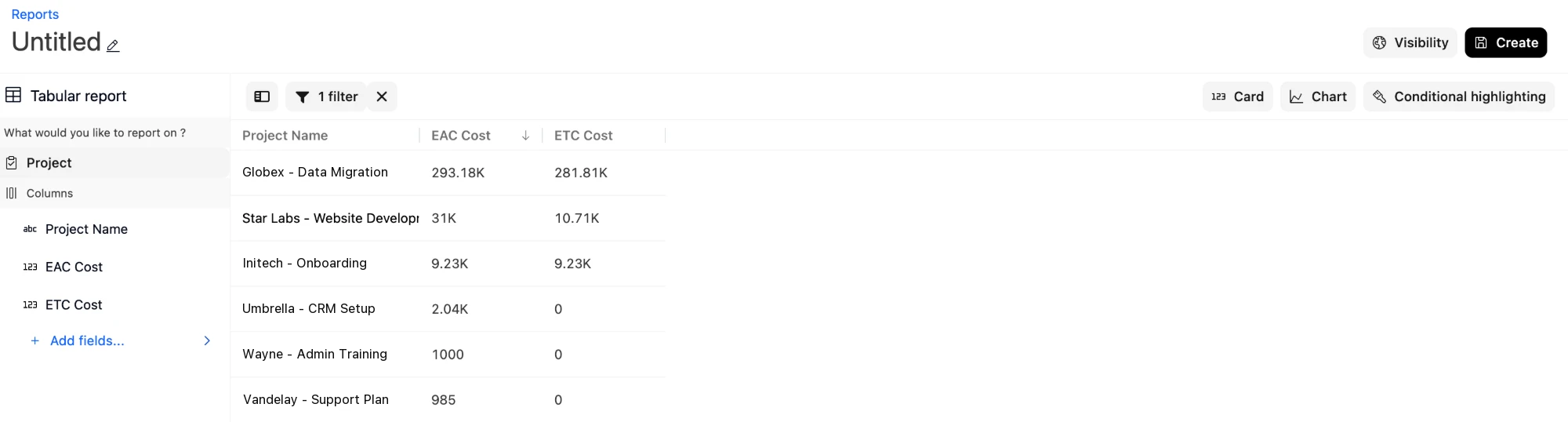
| Custom reports with the Project source | EAC Cost, ETC Cost | Report on and filter by project-level values |
| Custom reports with the Budget source | Budget EAC Cost, Budget ETC Cost | Report on and filter by budget-level values |
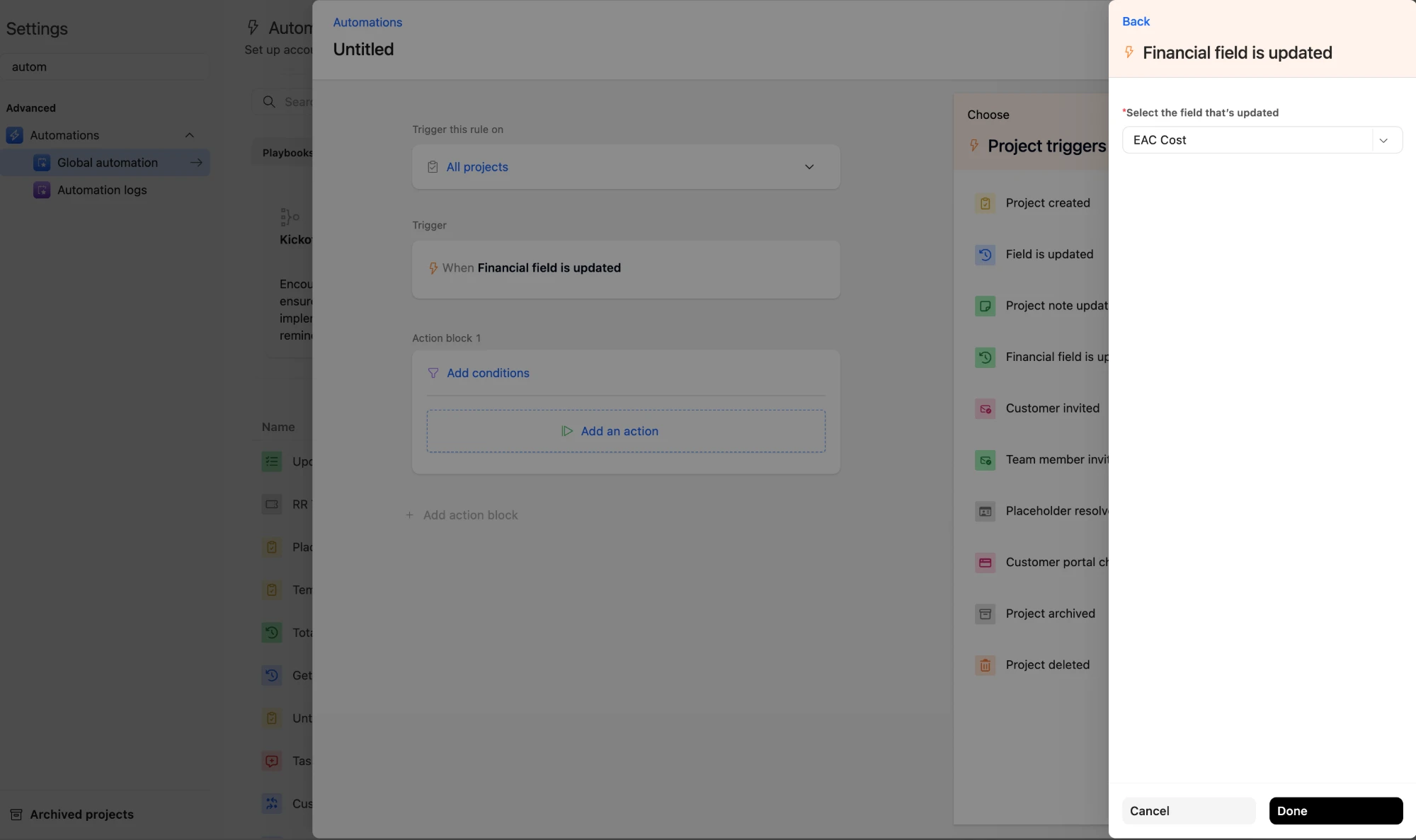
| Automations | EAC Cost, ETC Cost | Run an automation when either value changes, using the Financial field is updated trigger |
For example, a custom report with the Project source can list EAC Cost and ETC Cost for each project:
In a global automation, select the Financial field is updated trigger, then select EAC Cost or ETC Cost as the field that's updated:
FAQ
Why Is ETC Cost 0?
ETC Cost is 0 when no cost remains to be forecast. This happens when the project or budget is marked as completed, when there are no remaining allocations or open task effort, or when the team members with remaining allocations have no cost rate. For the hours version, refer to Why is ETC "0"?
Why Is My Expense Budget Missing From ETC Cost?
Only non-billable expense budgets count toward ETC Cost. Billable expense budgets are not included. A non-billable expense budget also adds nothing once the expenses approved against it reach the budget amount.
How Is EAC Cost Different From Planned Cost?
Planned cost is the cost of the original plan: all allocations on the project plus its non-billable expense budgets. EAC Cost replaces the part of the plan that has already happened with what was actually spent, then adds the forecast for the remaining work. The two match only when the project is tracking exactly to plan.
Why Did EAC Cost Change When No One Logged Time?
EAC Cost also changes when allocations are added or removed, when cost rates change, when an expense is approved, when an expense budget changes, and, on manually allocated projects, when days pass with allocated hours that were not tracked.
Summary
- ETC is the work still left on a project, and EAC is the work done plus the work left. Both are calculated in hours and in cost.
- ETC in hours comes from remaining allocations on manually allocated projects, and from remaining task effort on auto-allocated projects.
- ETC Cost is the cost of the remaining time plus unspent non-billable expense budgets. EAC Cost is tracked cost plus ETC Cost.
- When a project or budget is completed, ETC Cost is 0 and EAC Cost equals tracked cost.
- EAC Cost and ETC Cost appear in project and budget list views, filters, custom reports and automations, and EAC Cost drives the Tracked cost / Estimate at completion (EAC) cost revenue recognition method.